

2D & 3D Site Plan Rendering Services
Transform technical site plans and master plans into clear, presentation-ready visuals that communicate buildings, lots, roads, parking, circulation, landscape, amenities, and surrounding context.
Choose a 2D site plan for clear plan-based communication or a 3D site plan for greater depth, massing, materiality, and spatial understanding.
CAD · PDF · Site Plans · Master Plans · Existing 3D Models Accepted
Marketing CGI
Aerial CGI
Floor Plans
Virtual Tour
3D Animation

SEE THE WHOLE DEVELOPMENT
What is a Site Plan Visualization?
A site plan shows how buildings and external spaces are organized across a property or development. Depending on the project, it may communicate building footprints, lots, roads, access points, parking, pedestrian routes, landscape, open space, amenities, terrain, and surrounding context.
We turn this project information into either a clear 2D site plan or a 3D site plan visualization, depending on what your clients need to understand.
2D or 3D Site Plan?
Select the level of detail and presentation style that best fits your project.

2D Site Plan
Clear, Graphic & Easy to Reference
A 2D site plan provides a top-down view of the development, making it simple to identify and compare buildings, lots, roads, parking areas, landscapes, and other site elements.
By adding colors, labels, legends, landscape graphics, and project branding, the technical source plan can be transformed into a clearer presentation and marketing visual.
Best for:
- Lot and unit maps
- Sales plans
- Property brochures
- Development presentations
- Clear site orientation
Can include:
Building footprints - Lots and boundaries - Roads and driveways - Parking - Pedestrian routes - Landscape - Amenities - Labels - Branding

3D Site Plan
Spatial, Detailed & Presentation-Ready
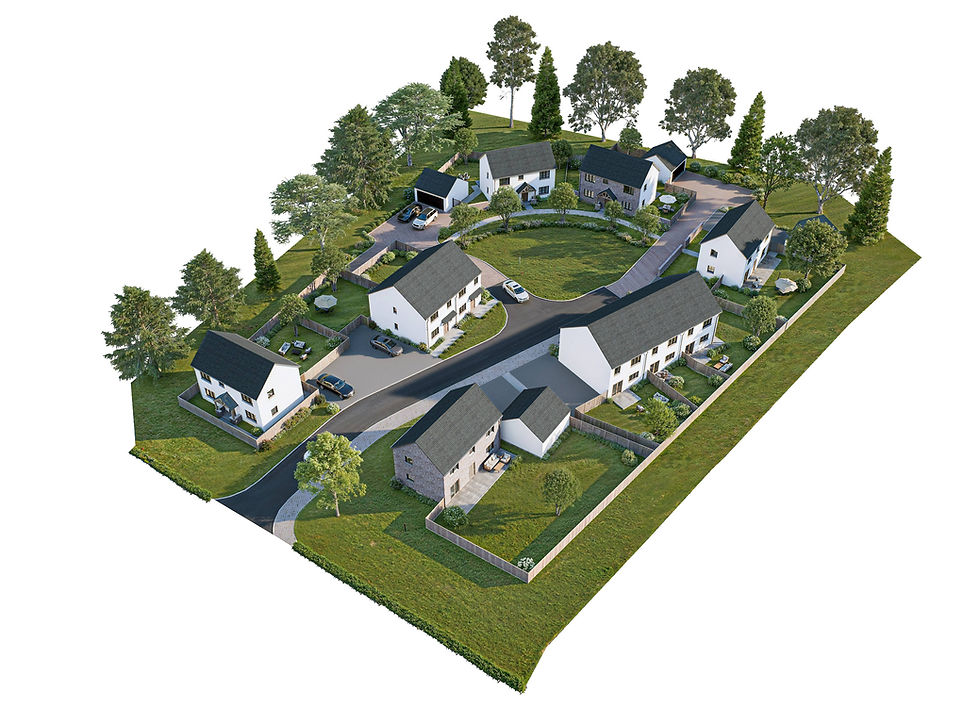
A 3D site plan rendering adds height, depth, materials, landscape, terrain, lighting, and architectural massing to the site layout, making the relationship between buildings and their surroundings easier to understand.
Depending on the project, the site can be presented from a controlled top-down view or an elevated aerial perspective to emphasize development scale, circulation, landscape, amenities, and surrounding context.
Best for:
- Real Estate Developments
- Master Plans
- Investor Presentations
- Pre-Construction Marketing
- Project Launches
Can include:
3D buildings - Roads and parking - Terrain - Landscape - Pools and amenities - Pedestrian routes - Surrounding context - Materials
What Can Be Shown in a Site Plan?
Buildings & Lots
Buildings, parcels, unit groups, and development zones.
Roads & Parking
Access roads, driveways, parking, and vehicle circulation.
Landscape & Amenities
Planting, parks, pools, recreation, and shared outdoor spaces.
Paths & Public Spaces
Walkways, plazas, pedestrian connections, and seating areas.
Terrain & Context
Levels, slopes, neighboring buildings, roads, and surrounding landscape.

Site Visualization for Different Development Scales
Residential Developments
Houses, villas, townhouses, multifamily projects, and residential communities.
Subdivisions & Land Developments
Lots, internal roads, access, housing groups, landscape, and development phases.
Commercial & Mixed-Use
Offices, retail, hospitality, mixed-use developments, parking, service access, and public areas.
Resorts & Hospitality
Accommodation buildings, pools, landscape, pathways, recreational areas, and site-wide amenities.
Community & Amenity Projects
Parks, sports areas, clubhouses, pedestrian networks, and shared outdoor environments.
Large Master Plans
Multi-building developments where phasing, circulation, land use, landscape, and overall project relationships need to be communicated clearly.
3D Master Plan Visualization
For larger residential, mixed-use, commercial, or phased developments, we can extend the site plan into a broader master plan visualization that communicates multiple buildings, roads, lots, landscape, amenities, development phases, and surrounding context in one coordinated visual.
Choose the View That Best Explains the Site
Choose the view that best suits your project, or combine several views for a more complete overview.
Bird’s-Eye View
A direct overhead view focused on overall layout, zoning, building placement, roads, parking, and landscape relationships for 2D and 3D site plans.
Aerial View
An elevated angled view that adds building height, depth, terrain, and surrounding context while keeping the overall development clearly visible.
Presentation-Focused Aerial
A more visually driven viewpoint designed to highlight architecture, landscape, amenities, and the character of the development.
2D site plans are presented as direct Bird’s-Eye Views.
3D site plans can use Bird’s-Eye View or elevated Aerial Views depending on the presentation goal.


Adapt the Site Plan to Your Project
Labels & Lot Numbers
Building names, unit numbers, lots, zones, or amenity labels.
Project Branding
Logo, brand colors, project name, title block, and presentation graphics.
Landscape or Portrait Format
Final composition can be prepared for web, print, presentation boards, or brochures.
Development Phases
Different phases can be identified through color, labels, or separate versions.
Marketing or Informational Style
Choose a clean diagrammatic direction or a more atmospheric presentation depending on the intended audience.

What We Need to Get Started
Send the most up-to-date site or master plan available. CAD or PDF drawings are ideal, and existing 3D models can also be used when available.
Site / Master Plan
CAD, PDF, or clear source drawing showing the proposed layout.
Building Information
Building footprints, elevations, drawings, Google Maps address or existing 3D models where relevant.
Landscape Information
Landscape plan, planting zones, amenities, paving, or open-space information.
Materials & References
Architecture, landscape, materials, branding, and presentation references.
Labels / Phasing
Lot numbers, building names, legends, phases, or other information required in the final visual.
One Development - Two Views to Communicate It


Built for Development & Design Teams
Real Estate Developers
Communicate the complete development, including lots, buildings, access, landscape, amenities, and surrounding context.
Architecture & Planning Teams
Translate technical site information into clearer visuals for presentations, stakeholder communication, and design discussions.
Property Marketing Agencies
Create presentation-ready site plans for brochures, websites, sales material, and property launches.
Landscape Designers
Present planting, pathways, open spaces, amenities, and the relationship between landscape and architecture.
CGI & Visualization Studios
Extend production capacity for site plans, master plans, and aerial development visualization.


Looking for Pricing?
Pricing for 2D and 3D site plans depend on site size, number of buildings or lots, landscape complexity, terrain, source-file quality, level of architectural detail, labels, and the number of required views.
Need Multiple Site Plans?
We support residential developments, real estate marketing teams, and CGI studios with consistent site plans production across multiple plans, development, or recurring projects.
Related Visualization Services
Need a simpler top-down property layout? Explore our 2D floor plan service.
Clearly present the layout of individual apartments, houses, or villas.
Explore our 3D floor plan service.
Check our Instagram for more renderings.
Frequently Asked Questions
Find answers about plan styles, source files, customization, and pricing.
What is the difference between a 2D and 3D site plan?
What types of projects can you visualize?
Can you create a site plan from a CAD or PDF drawing?
Can a 3D site plan include terrain and surrounding context?
Is the final site plan a permit or survey drawing?
A 2D site plan presents the development from a direct bird's-eye view, making lots, roads, parking, landscape, and labels easy to locate. A 3D site plan adds building height, depth, materials, terrain, lighting, and landscape, giving a clearer sense of the completed development.
We create site plan visuals for residential developments, subdivisions, multifamily projects, commercial and mixed-use developments, hospitality projects, community spaces, and larger master plans.
Yes. CAD and PDF site plans are common starting points. Existing architectural drawings, landscape plans, surveys, and 3D models can also help depending on the project.
Yes. When suitable source information is available, you can incorporate terrain, neighboring buildings, roads, vegetation, and other surrounding context into the visualization.
No. Our site plan visualizations are presentation and marketing assets created from client-supplied project information. They do not replace certified survey, engineering, or permit documentation.
 |  |  |  |
|---|---|---|---|
 |  |  |  |